Large Account List
Introduction
This document outlines a new means of Single Sign-On into the Ensenta bRDC application. Note this new method is optional. The existing Single Sign-On method is still viable and recommended for most use cases.
Audience
The audiences intended for this document are the following:
- Product Management
- Software Developers - Server-to-Server Integration
- Software Developers - UI
- Operations
- Data Center Operations
- Quality Assurance
Use Case
This SSO method was developed specifically for the use case of an FI who has business RDC customers with more than 500 deposit accounts, and it is expected that all those accounts are to be be available to the End User within the application.
Of note to Partner integrations: This SSO method is FI specific. For existing FI relationships, the SSO method can remain unchanged with this method being implemented for the specific FI(s) meeting this Use Case.
Supported Message Sequence
The diagram below outlines the expected Request/Response interaction to complete this Single Sign-On process.
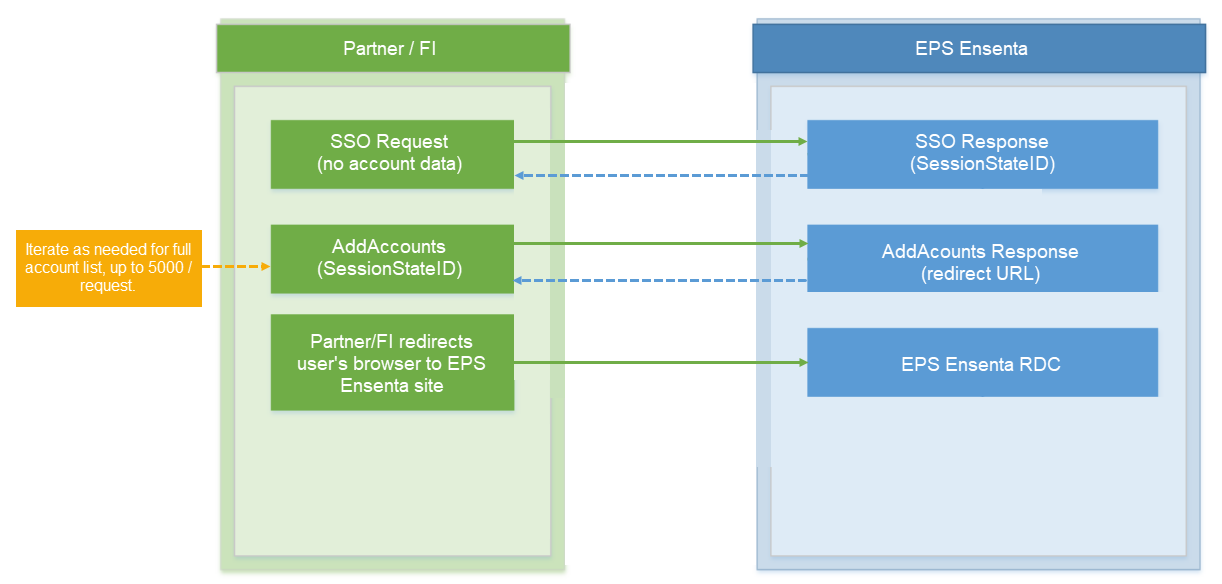
SSO Methods
Start Session
Required? Yes
This HTTP request is required to initate authentication for purposes of Single Sign-On into the bRDC application.
Target Service URL:
UAT: https://webdeposit.test.ensenta.com/SingleSignon/SSOStart.aspx
Prod: https://webdeposit.ensenta.com/SingleSignon/SSOStart.aspx
As this request is largely the same as the existing Single Sign-On request, for simplicity only the necessary modifications versus the existing request and response are noted here. For further details of the existing SSO specification, please refer to the API Reference section.
For this modified behavior in the SingleSignon Request described below to be properly handled, the appropriate Validation Method must be set in the Instituions profile in EZAdmin. Please coordinate with Ensenta for this change.
Start Session Request
The same Start Session HTTP request is used with the following modification:
The Account related parameters must be left out of the Start Session request:
- ANUM
- ADSC
- ATYP
- ASTAT
- AJOINT
Start Session Response
The response will return a SessionStateID GUID which is required for the subsequent AddAccounts request.
The redirect URL will be now be returned in the AddAccounts Response.
AddAccounts
Required? Yes
Overview: The AddAccounts method is used to provide the accounts needed for deposit activity within bRDC. At present, up to 5,000 accounts can be accommodated in a single AddAccounts request.
Target Service URL:
UAT: https://webdeposit.test.ensenta.com/PartnerAPI/PartnerDepositRequest3.svc
Prod: https://webdeposit.ensenta.com/PartnerAPI/PartnerDepositRequest3.svc
The AddAccounts method can be used in an iterative manner, i.e. passing groups of accounts in multiple Requests. Some notes specific to this type of interaction:
- If there are one or more valid accounts in the session, we will return the '00' success response code along with the landing URL that will be the same throughout the session.
- In general, we would recommend completing all
AddAccounts Requestsbefore redirecting the user to the landing page to ensure that all accounts will be available to the End User in the application. SubsequentAddAccountscalls will only append new accounts. Any accounts passed in that were added in the session from previousAddAccountscalls will be ignored.
Do not send fields as Null. All fields must be passed with a value or empty. Use basicHttpBinding, and don't use message security, but only transport level security (SSL).
Request Example:
 <par:SessionStateId>a15adeac-ae2c-47dc-86ca973a7bc79dfb</par:SessionStateId>
 <par:Accounts>
 <par:Account>
 <par:AccountNumber>20202</par:AccountNumber>
<par:Description>RenSaving-20202</par:Description>
<par:AccountTypeCode>0</par:AccountTypeCode>
 <par:JointAccountHolderNames>
 <par:string>Tim</par:string>
 </par:JointAccountHolderNames>
 </par:Account>
 <par:Account>
 <par:AccountNumber>20203</par:AccountNumber>
<par:Description>RenChecking-20203</par:Description>
<par:AccountTypeCode>1</par:AccountTypeCode>
<par:JointAccountHolderNames>
 <par:string>Tim</par:string>
 </par:JointAccountHolderNames>
 </par:Account>
 <par:Account>
 <par:AccountNumber>20204</par:AccountNumber>
<par:Description>Money Market Checking-202024</par:Description>
 <par:AccountTypeCode>2</par:AccountTypeCode>
<par:JointAccountHolderNames>
 <par:string>Tim</par:string>
 </par:JointAccountHolderNames>
 </par:Account>
 </par:Accounts>
 </par:request>
 </par:AddAccounts>
 </soapenv:Body>
</soapenv:Envelope>
Response Example:
<s:Envelope xmlns:s="http://schemas.xmlsoap.org/soap/envelope/">
 <s:Body xmlns:xsi="http://www.w3.org/2001/XMLSchema-instance"
xmlns:xsd="http://www.w3.org/2001/XMLSchema">
 <AddAccountsResponse xmlns="http://ensenta.com/ECPartnerDepositRequest">
 <AddAccountsResult>
 <ResponseCode>00</ResponseCode>
 <ErrorResponseText/>
 <LocalizedMessageText/>
 <DepositUrl>https://rdc.test.ensenta.net/rdc2/landing/a15adeac-ae2c47dc-86ca-973a7bc79dfb</DepositUrl>
 </AddAccountsResult>
 </AddAccountsResponse>
 </s:Body>
</s:Envelope>