Overview
Smart Alerts Overview
The JHA/Ensenta Smart Alerts API is a flexible platform that empowers our customers to integrate their systems with the deposit as it moves through all possible phases of its lifecycle. There are three Smart Alerts API products currently available, each with their own targeted action:
- Smart Alerts API for Real-time PostingTM
- Smart Alerts API for Real-time NotificationsTM
- Smart Alerts API for Real-time Fraud MonitoringTM
The above Smart Alerts API products are supported as an add-on for deposits made through the following stand-alone products:
- Consumer RDC Desktop
- Consumer RDC Mobile (single check per transaction only)
- Business RDC Mobile (single check per transaction only)
Smart Alerts are sent to the Financial Institution or third-party vendor via a standard web service for the following deposit events:
- Deposit Submitted
- and/or -
- Deposit Item Approved – No Amount Adjustment
- Deposit Item Approved – Amount Adjusted Up
- Deposit Item Approved – Amount Adjusted Down
- Deposit Item Rejected
- Batch Review Complete
Each Smart Alerts API product will contain parameters most relevant to the action the product is targeted for (Posting, Fraud Monitoring, Notifications).
JHA/Ensenta Smart Alerts supports REST web services transmitted over TLS with the options for VPN and/or certificate-based mutual authentication.
Web Service Overview
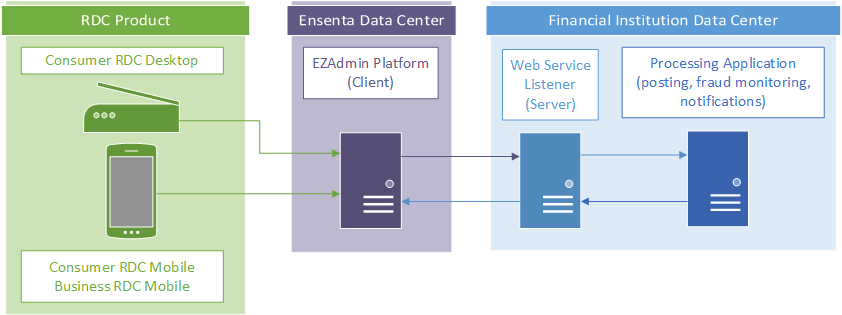
For JHA/Ensenta Smart Alerts, JHA/Ensenta is the “client” while the Financial Institution or third-party vendor is the “server”.
Deposits are submitted through one of the supported stand-alone products (see section Smart Alerts Overview) and received by the JHA/Ensenta EZAdmin platform. Depending on which alert events are being used (see section Alert Event Types Overview), the request/response exchange is handled by the following sequence:
- JHA/Ensenta’s system (client) sends a web service request to the Financial Institution’s or third-party vendor’s system (server).
- The Financial Institution’s web service validates the requests:
- The server presents a TLS certificate to the client.
- The client verifies the server’s TLS certificate.
- If successful, the client sends its authentication certificate to the server.
- The server verifies the client’s certificate or credentials.
- The Financial Institution’s web service makes the request to the processing application (for Posting, Fraud Monitoring, or Notifications).
- The Financial Institution’s web service sends a response to JHA/Ensenta indicating if the alert was successfully received/processed or not.
See section Connectivity and Authentication Overview for more details on connectivity options.
Connectivity and Authentication Overview
The following sections showcase the required and optional security methods available for JHA/Ensenta Smart Alerts API.
Firewall IP Restriction
Required
Ensure minimum access is exposed from client and server.
- Production and DR Environments:
- 34.28.25.58
- 35.245.22.123
- Non-production (UAT):
- 35.223.37.8
- 34.31.178.3
- 34.86.123.119
- 35.194.65.167
If there are any changes to the IPs in the future, JHA/Ensenta will send advance notification to the email contact provided on the Smart Alerts Setup Form.
TLS 1.2
Required
A valid TLS certificate signed by a third-party and a valid public DNS entry for the server are required to establish a secure connection.
If there are any changes to the supported TLS versions and cipher suites in the future, JHA/Ensenta will send advance notification to the email contact provided on the Smart Alerts Setup Form.
Client Authentication Certificate (Mutual Certificate Authentication)
Optional
For mutual certificate authentication, the “server” (your solution) can use a client authentication certificate to authenticate the calling “client” (JHA/Ensenta).
JHA/Ensenta will provide a certificate signed with the Sectigo © (formerly Comodo Cybersecurity) certification authority. There are separate certificates for production and non-production environments; JHA/Ensenta’s internal security practices require that production certificates not be used on non-production environments.
JHA/Ensenta will provide the public key of a digital certificate that your solution will use to authenticate the alert event request. Your solution must validate that the digital certificate sent with the alert event request is valid before processing.
Certificate renewal
As the certificate will be updated every two years, it is recommended that your solution is designed to support two certificates simultaneously to support a simple transition between the end-of-life certificate and the new certificate.
JHA/Ensenta will send advance notification to the email contact provided on the Smart Alerts Setup Form for certificate renewals.
Alert Event Types Overview
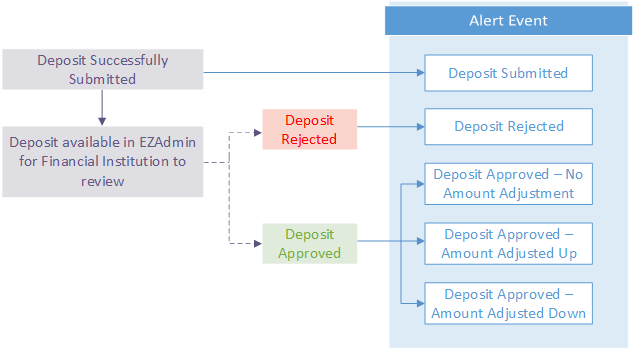
An alert can be sent for any enabled event that occurs in the JHA/Ensenta system. Depending on the requirements of the solution you are developing, you may decide to only leverage a subset of the five possible alert events.
Deposit Alert Event
The following event triggers an alert when the deposit is successfully submitted during the end-user experience. The deposit alert event will only be sent once.
- Deposit Submitted
Status Alert Events
Status alert events are events that are initiated during EZAdmin review by the Financial Institution’s proofing staff and determine if the check should be rejected or accepted. A check may be revisited by the Financial Institution and have the status and/or final amount of the check adjusted (see sections Days/work Hours of Proofing Staff and Multiple Status Alert Events for more details).
- Deposit Rejected
- Deposit Approved – No Amount Adjustment
- Deposit Approved – Amount Adjusted Up
- Deposit Approved – Amount Adjusted Down
- Batch Review Complete
Integration Certification Overview
To ensure a successful integration that results in a positive experience, JHA/Ensenta requires new integrations to complete an Integration Certification. Your solution will not be permitted into Production without first passing the Integration Certification in the Non-production (UAT) environment.
Once a contract has been signed for the specific smart alert product you will be integrating to, a Technical Support Engineer (TSE) will be assigned to facilitate the project. If the Financial Institution does not have the ability to connect to the Non-production (UAT) environment, your Technical Support Engineer (TSE) will setup a test Desktop RDC product with a manual login/registration process so you can make test deposits.
Below is a high-level integration project timeline:
- Week 1
- Project kick-off meeting
- Review example workflows and parameters
- Project kick-off meeting
- Week 1-2
- Certificates and UAT Setup
- Weeks 2-11
- API vendor begins development
- JHA/Ensenta will assist development efforts via e-mail and calls as needed
- Weeks 11-12
- Integration Certification – review and validation of your solution’s workflow and supported functionality by making test deposits and log reviews.
If possible, we request that you provide a workflow diagram of your solution for JHA/Ensenta to keep on record for future reference.