FAQ
Soap or JSON?
- The requests can be passed to our web service in either Soap or JSON format.
Remote Deposit vs Transaction Processing Engines
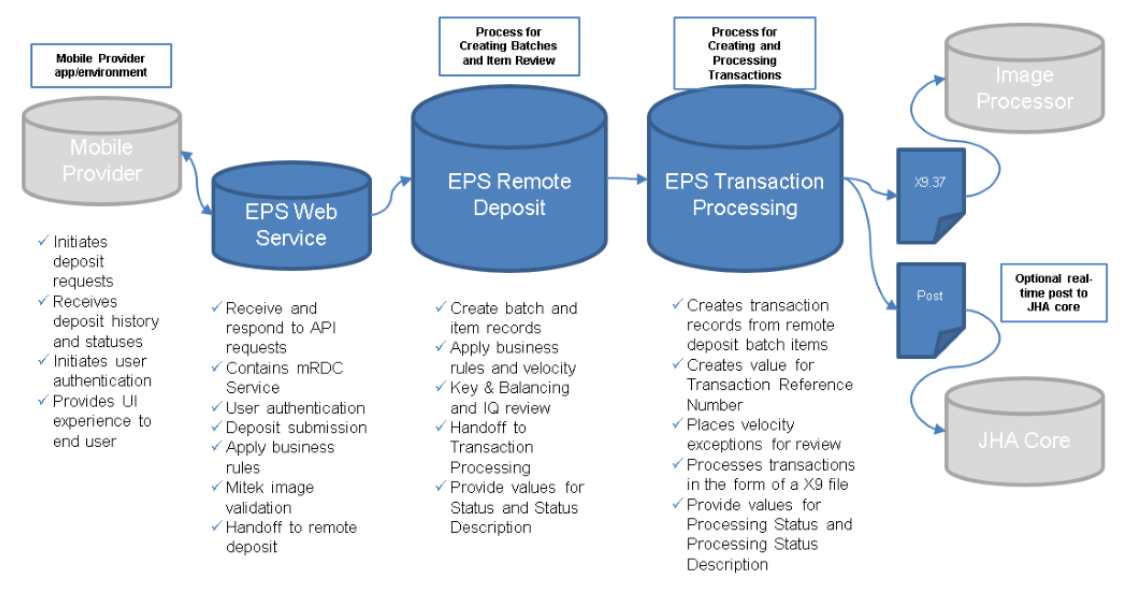
- There are two different processing engines to be aware of that affect each deposit made through the RDA web service, Remote Deposit and Transaction Processing. It is beneficial to understand their function in order to know what to expect on each deposit, and understand the meaning of the different statuses being returned in the web service. The below diagram illustrates the relationship between the two processing engines and where they fit into the overall process.
EPS Remote Deposit
This is the first engine in the process behind the web service and is primarily responsible for handling batches and several other key actions.
- New deposit batch and item records are created here as received from the web service for processing.
- Different business rules are applied such as velocity, and if there are exceptions, they will be flagged accordingly.
- Batches and items are reviewed by Keying and Balancing where corrections and or rejections may occur as needed.
- Each batch and item record will be updated with statuses accordingly throughout the process. The statuses that are applied by the remote deposit engine are labelled as “Status” and “Status Description” in the web service responses. See the “Statuses” section below for status definitions.
There are several factors that determine how quickly items move through the remote deposit process. If an item is not flagged for further review in Keying and Balancing, items will generally move through in several seconds. If items are flagged for further review (which could include issues with image quality, amount, MICR, or balancing), it may take several minutes to up to an hour depending on the current workload in the Keying and Balancing queue at that time. Once all remote deposit process steps are complete, items are handed off to Transaction Processing for further processing.
EPS Transaction Processing
This engine takes place after remote deposit and is primarily responsible handling transactions and several other key actions.
- When items are received from remote deposit, Transaction processing creates transactions from those items. This is when a transaction reference number will be generated.
- If any velocity exceptions resulted in a suspended status, those transactions will be placed in a review queue where they will wait to be manually reviewed.
- Each transaction will be updated with statuses accordingly throughout the process. The statuses that are applied by the Transaction Processing engine are labelled as “Processing Status” and “Processing Status Description” in the web service responses. See the “Statuses” section below for status definitions.
- At the specified cutoff time, transactions will be processed into an X9 file for delivery. Delivery method of the file is dependent upon options chosen during implementation.
Different types of statuses?
Transaction Statuses and their Definitions (Processing Status and Processing Status Description)
- Declined – EPS decline due to invalid RT, duplicate transaction, or velocity exception.
- Approved – EPS approves; transaction is waiting to process.
- Error – The transaction is in an error state. Contact Support.
- Voided – The transaction was voided by the customer.
- Processed – File created.
- Collected – Return item recovered.
- Awaiting Capture – Awaiting payment capture, such as card number.
- Awaiting Approval – If using dual authorization, transaction is submitted awaiting approval from customer.
- Suspended – Velocity exception awaiting review.
- In Collection – Return item in collection.
- In Research – A non-standard return reason. See R Code for details.
- Unauthorized – Return item.
- Disputed – Return item.
- Uncollected NSF – Return item.
- Invalid/Closed Account – Return item.
- Other Check21 Returns – Check 21 return items that do not fall into Disputed, Uncollected NSF, or Invalid Closed Account.
- Resolved – A transaction has been marked as resolved. Resolved can only occur with an operation in JHA SmartPay BusinessSM. This is a status that lets the SPB user know it has been addressed, such as a void or refund.
Remote Deposit Statuses and their Definitions (Status and Status Description)Item Statuses
- Approved – Check item has been approved.
- Check Decisioning Error – An error occurred while the check was being decisioned, or when the system tries to figure out what type of payment it is.
- Closed – This means the check item is closed and can no longer be edited/rescanned.
- Created – The check item has been created (status remains until further actions have been taken place).
- Deleted – The check item has been deleted.
- Error – There was an error when the item was submitted.
- Needs Attention – This check item needs attention either from EPS or the FI (typically when the amount confidence isn’t high enough or when the entered amount isn’t correct and needs adjustment).
- Needs Rescan – The check item needs to be rescanned.
- Rejected – The item has been rejected. The reject reason should be returned by the API when the user submits the check.
- Rescanned – The check item has been rescanned.
- Resolved – This is the status an item changes to right before it is picked up by our system to be processed or rejected.
- Sent to Processing – The item has been sent to be processed through our transaction processing system.
- Processing Error – There was an error while processing the item.
Batch Statuses
- Deleted – This batch has been deleted.
- Deposited – The full batch has been deposited.
- Deposited With Adjustment – The batch has been deposited with an adjustment of the amount.
- Needs Rescan – This batch has items that must be rescanned.
- Open For Scanning – This batch is open for scanning.
- Partial Deposit – This batch has been deposited.
- Rejected – This batch has been rejected.
- Submitted – The batch has been submitted for deposit.
- Unknown – There was an unspecified error.