Online Banking Application Integration
All details specific to online banking application integration are captured in the following sections:
End Points
The following end points are available to the integrator by the Zelle Toolkit.
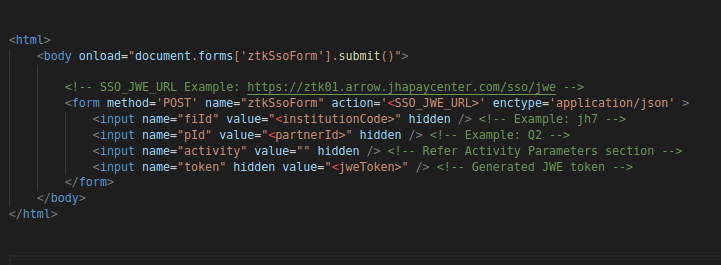
The integrator must launch the Zelle experience using the endpoint in an iFrame and while accessing the URL, data must be posted to the endpoint.
| S. NO | PURPOSE | ENDPOINT | ENDPOINT | DESCRIPTION |
|---|---|---|---|---|
| 1 | Approach 1 – POST URL | https://<base-url>/sso/jwe/ | POST | Launch URL for the ZTK. Data that must be posted to the launch URL is contained in the POST Payload section. When the user enters the Zelle experience, the FI’s web application will post the data to the launch URL. The SSO Handler will validate the parameters submitted to the URL and create the user’s session in the ZTK and launch the ZTK web application. |
| 2 | Approach 2 – SSO Token Generation URL | https://<base-url>/api/sso/jwe/token | POST | SSO Token Generation URL for the ZTK. Content Type – application/json Data that must be posted to the launch URL is contained in the POST Payload section. The endpoint will validate the parameters return the SSO Token which can be used to launch the ZTK. Response format is captured in the ZTK SSO Token API – Response Format Section |
| 3 | Approach 2 – Zelle Launch URL | https://<base-url>/launch?SSOToken=<ztk-sso-token> | GET | Endpoint to launch ZTK in Approach 2. |
Post Payload
Parameters included in the POST payload are contained in the below table.
| PARAMETER | TYPE | DESCRIPTION |
|---|---|---|
| fiId | string | The three letter ID of the Financial Institution (Org ID) assigned by the JHA PayCenter install coordinator during on-boarding. |
| token | string | The JWE token generated for the SSO handshake. Required details of the token are contained in the JWE section of the document. |
| pId | string | The three letter ID of the Technology Partner of the Financial Institution. |
| activity | string | The activity the user is attempting. Activity requirements are shown in the Activity section of the document. |
Activity Parameters
Four options are available for the activity parameters, which are used to identify the page the user sees after the process completes.
Empty string (“”) should be passed to navigate to the Zelle landing-screen.
| PARAMETER | TYPE | DESCRIPTION |
|---|---|---|
| activity | enum | Available options:
|
Post Payload - Supported Content Types
The launch point URL supports two content types – application/json and application/x-www-form-urlencoded. Sample payloads for supported content types are explained in the table below.
| CONTENT TYPE | EXAMPLE PAYLOAD |
|---|---|
| application/json | "fiId": "F01", "pId": "P00", "token": "ZXlKbGJtTWlPaUpCTVRJNFEwSkRMVWhUTWpVMklpd2lZV3huSWpvaVVsTkJMVTlCUlZBaUxDSnJhV1FpT2lKallrRmphVnBPWm1wdGJVc3lhMVZDUVhaSWRVMDVNM0pzUlRrdFpFc3RTVFIzZWxVMU1UWmFUMGxqSW4wLkRod1ZaNnl0MHYyOWJFUGVsTWpYeGdyVExiNmlBLVY3UzF0Y19DM0pmdTQ1TkFDa3BEX2ExanVOd1BjSll6dDNuVi1pUVUyUHFfSEd4MnFBOXlCbUwtc2Z0amlUaGZvdlVsWGpIZFV4QUpKODRwdV8zRV9Gc2pSZWVnYWRRNlYwYnVOYnh1SVY1SmpJZXRmNkJmVFdZRFpaNHFQQ1R4enRVZmowejJKWWxtcGNpbjBaRUs3NDMzSlotQmFvbDduWm1GbVhUNmxINjRWeWhKYVl1NUs2RjRfdFB1NUdlMklsTWhfOUFtVW1fOE5rYlhvV3hNdGpoTTZodXNVcGlPa3FFUFVwQXNlN09icE9sV2diaWpzVlFkNjF1c3pkYlMwbFRVdlQxSnY0UnZkUzFDd3NjMlRybE15SjVha2JFUNjBEc3ZUMUl6UDV3VXN3Mk9ITGM2OXlzb2J0dk9FMmdNQjBzUmEuWFpqYTlUVENrV0hNYTZ5dEJpbFMyQQ==", "activity": "" |
| application/x-www-form-urlencoded (On-ly for the Direct Post method) | fi-Id=F01&pid=P00&activity=&token=ZXlKbGJtTWlPaUpCTVRJNFEwSkRMVWhUT-WpVMklpd2lZV3huSWpvaVVsTkJMVTlCUlZBaUxDSnJhV1FpT2lKallrRm-phVnBPWm1wdGJVc3lhMVZDUVhaSWRVMDVNM0pzUlRrdFpFc3RTVFIzZWxVMU1UWmFUMGxqSW4wLkRod1ZaNnl0MHYyOWJFUGVsT-WpYeGdyVExiNmlBLVY3UzF0Y19DM0pmdTQ1TkFDa3BEX2ExanVOd1BjSll6dDNuVi1pUVUyUHFfSEd4MnFBOXlCbUwtc2Z0amlUaGZvdlVsWG-pIZFV4QUpKODRwdV8zRV9Gc2pSZWVnYWRRNlYwYnVOYnh1SVY1SmpJZXRmNkJmVFdZRFpaNHFQQ1R4enRVZmowejJKWWxtcGNpbjBa-RUs3NDMzSlotQmFvbDduWm1GbVhUNmxINjRWeWhKYVl1NUs2RjRfdFB1NUdlMklsTWhfOUFtVW1fOE5rYlhvV3hNdGpoTTZodXNVcGlPa3FFUFVwQXNlN09icE9sV2diaWpzVlFkNjF1c3pkYllZWckdhaHJBLm02NF9OVE00WTh0SjZBeEJEMloxNFJ3ZHFUNjBEc3ZUMUl6UDV3VXN3Mk9ITGM2OXlzb2J0dk9FMmdNQjBzUmEuWFpqYTlUVENrV0hNYTZ5dEJpbFMyQQ== |
ZTK SSO Token Api – Response Format
Response for ZTK SSO Token API will contain two parameters.
| PARAMETER | TYPE | DESCRIPTION |
|---|---|---|
| Token | String | Holds the ZTK SSO Token |
| Errors | Array <String></String> | Holds array of error messages. |
Sample Response
{
    “errors”: []
    “token”: <secure access token>
}
JSON Web Encryption
JSON Web Encryption is used to exchange information between the integrator and the ZTK; the payload being encrypted by the integrator using the public key.
When received in the ZTK, the JWE token is validated using the corresponding private key. If the JWE token is successfully validated, the ZTK User Interface is launched.
The payload must contain the following information:
- User Profile
- Digital Account Information
- Legal ID Information – Legal ID and Legal ID Type
- Expiry Time
- Core Customer ID Information (Optional)
JWE Payload Schema
Various parameters to be included in the JWE Payload are described in the following section:
| PARAMETER | TYPE | DESCRIPTION |
|---|---|---|
| acc | AccountListSchema[] | Account list |
| iss | string | The issuer of the JWE Token. The value should be shared by the integrator to the JHA PayCenter team while onboarding. |
| aud | string | Recipient for which the JWE is intended. The value should be shared by JHA PayCenter to the integrator team while onboarding. |
| tkn | TokenListSchema[] | List of available tokens |
| lei | string | Legal Entity Id |
| let | string | Legal Entity ID Type. |
| iat | number | JWE Token issued at (Unix timestamp) |
| exp | number | Token Expiration (Unix timestamp) |
| sto | number | Idle Session Timeout (seconds) The session would timeout if there is no activity by the user for the specified number of seconds. |
| cci | string | Core Customer Id (Optional field) To uniquely identify the individual in case of joint account. |
Account List Schema
The list of accounts available for the user in the financial institution:
| PARAMETER | TYPE | DESCRIPTION |
|---|---|---|
| id | string | The account identifier |
| typ | enum | Available account types:
|
Token List Schema
The list of tokens that are registered with the user in the financial institution. Supported token types:
- Email address
- US mobile phone number
| PARAMETER | TYPE | DESCRIPTION |
|---|---|---|
| id | string | Email address or US mobile phone number |
| typ | enum | Available types:
|
Supported Legal Entity Identifiers
Supported Legal Entity type Identifier (let) values are captured in the table below.
| VALUE | DESCRIPTION |
|---|---|
| DriverLic | Driver License |
| PassPort | Passport |
| TaxId | Tax ID. Should be a valid 9 character identifier. |
| ResidenceCard | Residence card |
| MltryId | Military Id |
| Oth | Legal entity identifiers other than above |
Example Payload (Content Type – Application/Json)
{
    "acc": [
    {
        "id": 123456,
        "typ": "S"
    },
    {
        "id": 123457,
        "typ": "D"
    }
    ],
    "tkn": [
        {
        "id": "email@gmail.com",
        "typ": "email"
        },
        {
        "id": "5123456789",
        "typ": "mobile"
        }
    ],
    "lei": "4321123",
    "let": "DriverLic",
    "cci": "564567876",
    "iat": 1596624931,
    "exp": 1596625231,
    "sto": 600,
    "iss": “Q2”,
    "aud": “JHA-ZTK”
}
Generating the JWE Token
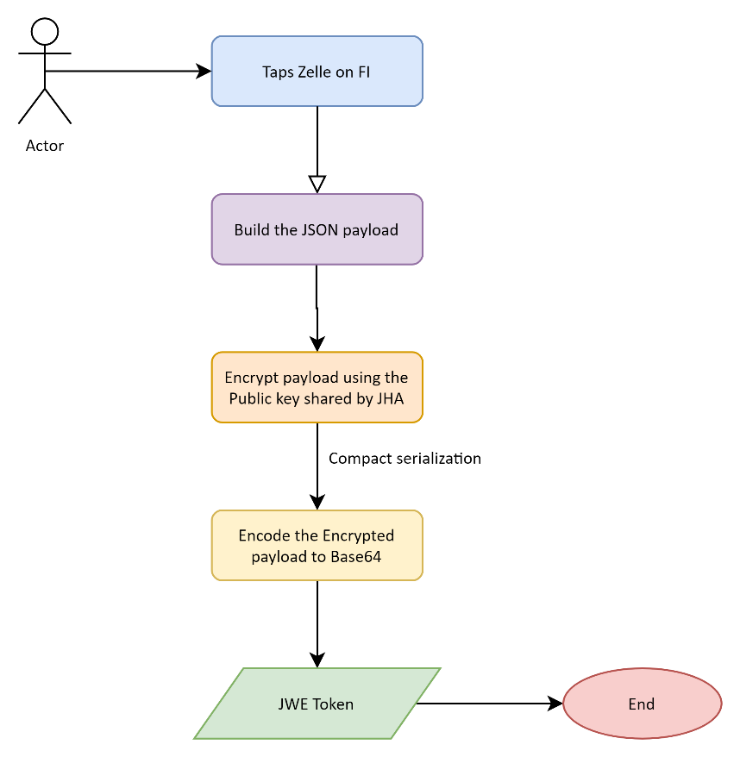
The following section captures the sequence of steps needed to successfully generate the JWE token:
- The JSON payload contained in the JWE Payload Schema section is generated.
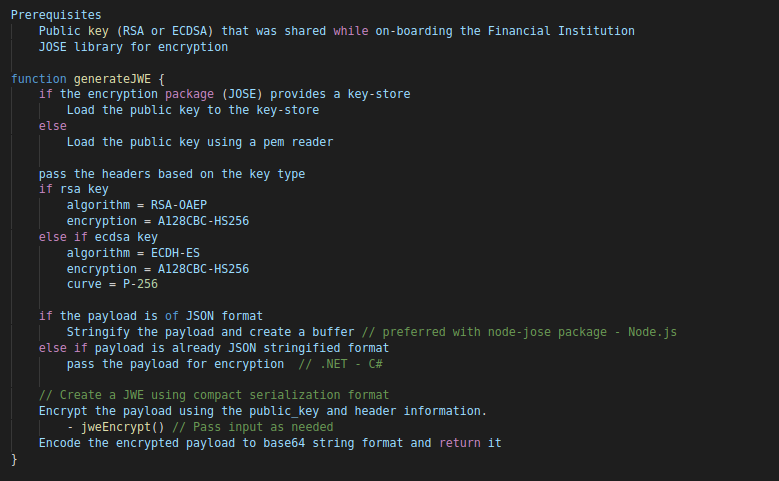
- The JSON is encrypted using the public key shared by JHA PayCenter.
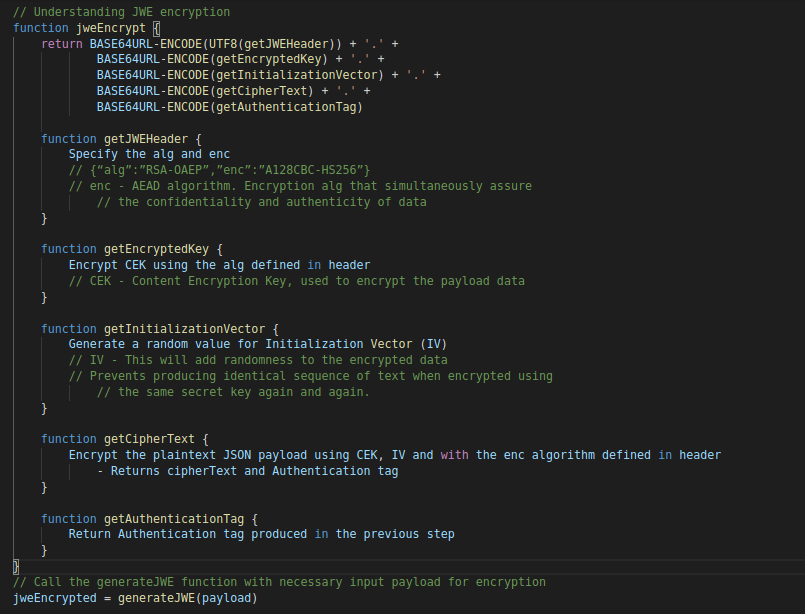
- The encrypted payload is compact serialized by Base64, encoding the encrypting key.
The sequence of generating the JWE token is shown in the below diagram:
JWE Generation - Psuedo Code
Example Usage With Node.Js Code
A sample Node.js code snippet, shown below is used to generate the JWE token (encryption using the public key):
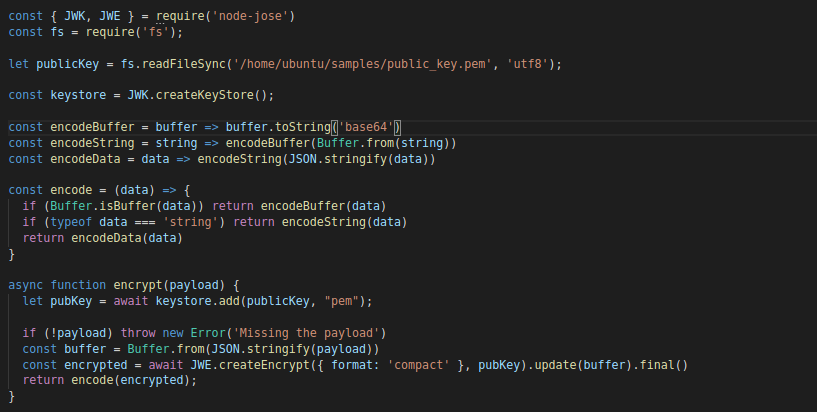
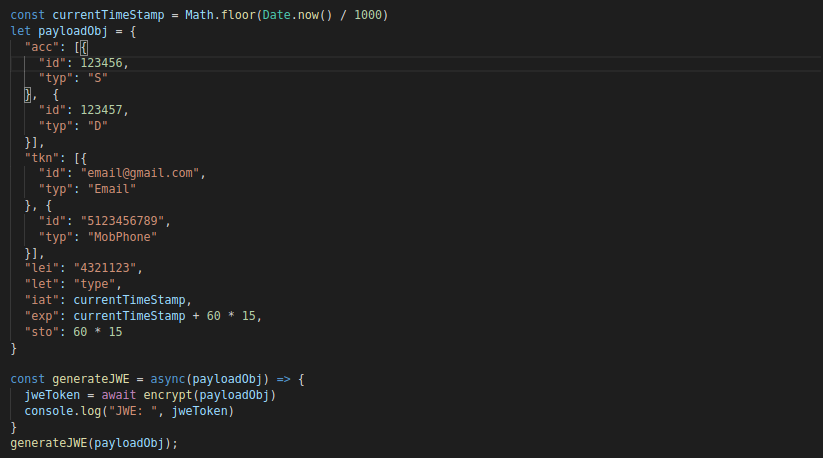
Notes
- ‘node-jose’ – Node Package Manager is used to sign and create the JWE.
- ‘fs’ - package to read the private key.
- Payload object is the data to be encrypted.
Example Usage With Dotnet – C# Code
A sample .NET code snippet, shown below is used to generate the JWE token (encryption using the public key):
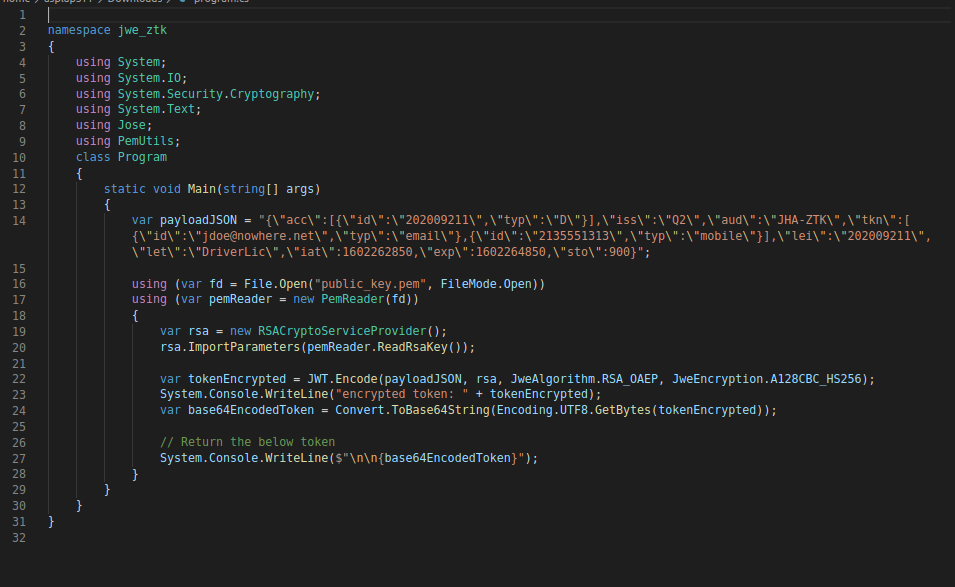
Launching Zelle Experience
The following are two ways the ZTK application can be launched.
- Using iFrame
- Redirection
The ZTK API, /sso/jwe, should be accessed from a secure domain (https) to launch the Zelle Toolkit.
Using Iframe
Example code snippet is as follows.
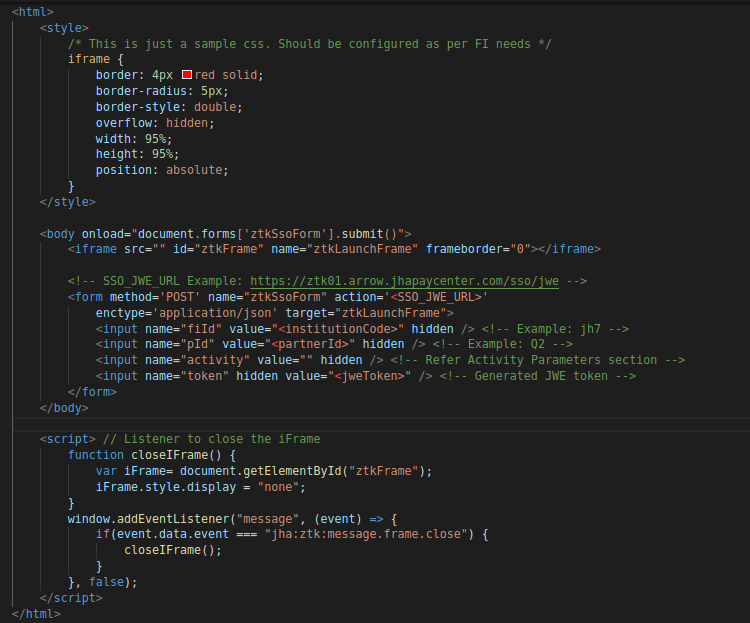
The iFrame can be closed only from below two pages -
- Zelle Landing Page
- Initial “Get Started” page.
This is to provide user with an option to navigate back to the parent FI application from ZTK using the back arrow button present on the top-left corner.
The script section in the above code snippet describes the same.
Launching the ZTK in an iFrame requires the host application (FI application) to be secured (https).
Redirection
To launch the ZTK application in a separate window, refer the sample code snippet is as follows.